Yes, you can run Muse Spark Open locally, but only on a very large machine. The smallest usable quants are about 225 to 305 GB, so the realistic home setups are a 512 GB Mac Studio running a 2- or 3 bit build, two Mac Studios linked together (the setup Meta itself recommends), or a workstation or server with at least 256 GB of combined RAM and VRAM running a 2 bit GGUF in llama.cpp. The full BF16 weights are about 1.64 TB, which is data center territory.
This guide covers what Meta released on 15 October 2026, how much memory each format needs, working llama.cpp and MLX commands, what "local" means for vLLM and SGLang, the licence terms, and when a smaller model is the better choice.
What Muse Spark Open is
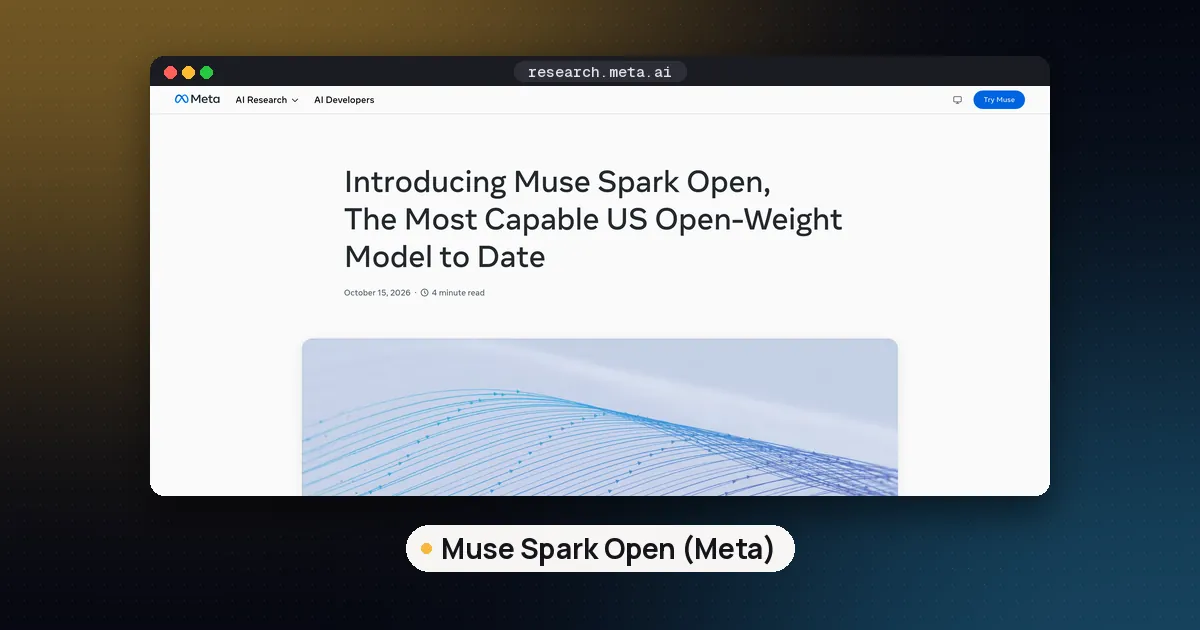
Muse Spark Open is the open weight version of Meta's Muse Spark model. According to Meta's launch post and the Hugging Face model card, it is a natively multimodal mixture of experts (MoE) model with 816B total parameters and about 42B active per token, a 1M-token context window, and text, image, video and audio input with text output. Meta built it for coding and agentic work: long horizon tasks, tool use and multistep software engineering.
The architecture matters for local use. Each of the 62 layers has 256 experts and a router picks 8 per token. The Hugging Face launch blog puts it plainly: all 256 experts stay in memory, so you need the memory of an 816B model, but each token only computes with about 42B parameters, so it generates faster than a dense model of the same size. In short, active parameters set your speed and total parameters set your memory.
| Spec | Value (Meta model card / HF blog) |
|---|---|
| Total / active parameters | ~816B / ~42B |
| Layers, experts | 62 layers, 256 experts, top 8 routing |
| Context | 1,048,576 tokens (shared across modalities) |
| Inputs / output | Text, image, video, audio / text |
| Official checkpoints | BF16 and NVFP4 |
| Recommended sampling | temperature 1.0, top_p 1.0, top_k disabled |
| Reasoning effort | low, medium, high, xhigh (default xhigh); cannot be turned off |
| Licence | Muse Model License (limited commercial terms) |
Meta's card also says the open version got extra safety post training and recommends deploying it inside a system with its own guardrails, not as a bare model.
Muse Spark Open hardware requirements
Plan memory from the size of the files you download, plus room for the KV cache and the runtime. The sizes below are the totals of each repository's weight files on Hugging Face, checked on 16 October 2026 (decimal GB).
| Build | Format | Size on disk | Realistic hardware |
|---|---|---|---|
| Unsloth UD-IQ1_S / UD-IQ1_M | GGUF | 176 / 209 GB | 256 GB RAM+VRAM (experiments only) |
| Unsloth UD-IQ2_XXS | GGUF | 226 GB | 256 GB RAM+VRAM |
| Unsloth UD-IQ2_S | GGUF | 276 GB | 320 GB+ |
| ggml-org Q2_K (imatrix) | GGUF | 304 GB | 512 GB Mac or 384 GB+ box |
| MLX oQ3e | MLX | 371 GB | 512 GB Mac Studio |
| Unsloth UD-Q3_K_XL | GGUF | 402 GB | 512 GB |
| ggml-org Q4_K_S | GGUF | 470 GB | 512 GB is tight; more is better |
| MLX 4 bit / Meta NVFP4 | MLX / safetensors | 533 GB | Two Macs, or Blackwell GPUs |
| ggml-org Q8_0 | GGUF | 872 GB | ~1 TB of memory |
| Meta BF16 | safetensors | 1.64 TB | Multi-node GPU cluster |
Some reference points from people who have actually run it:
- Hugging Face tested the Q2_K GGUF on a 512 GB M3 Ultra Mac and reports about 18 tokens per second, with 304 GB used by the model and plenty left for the KV cache. The oQ3e MLX quant on the same machine took about 344 GB of memory and ran at roughly 21 tokens per second of generation in their short prompt test.
- Unsloth's guide says its UD-IQ2_XXS quant fits on devices with 256 GB of RAM, VRAM or unified memory, but recommends UD-IQ2_S as the minimum for agentic tasks, because its tests show smaller quants degrade on general tasks. Chat style use holds up even on the smallest quants.
- Meta's own card says the NVFP4 checkpoint needs GPUs with at least 700 GB of VRAM in total and BF16 needs about 2 TB.
Long context costs extra memory on top of the weights. The Hugging Face blog works out about 250 KB per token of KV cache in BF16 if every layer keeps a full cache, which would be about 266 GB at the full 1M tokens. SGLang's notes add that 46 of the 62 layers use a 2,048 token sliding window, so engines that take advantage of that need less. Either way, start with 32K to 128K of context and raise it only when you need it. Our VRAM guide and KV cache quantization guide explain the tradeoffs.
Run Muse Spark Open with llama.cpp
llama.cpp is the most flexible local path, because it can split a GGUF across GPU VRAM and system RAM. Support was merged on 15 October 2026 in pull request #30616, and the first release build that includes it is b11671. Any build older than that will not recognise the model.
- Install or update llama.cpp to b11671 or newer (a prebuilt release, Homebrew, or a source build with CUDA or Metal).
- Make sure you have the disk space: the Q2_K download alone is about 304 GB, plus the vision and audio projector file (2.2 to 4.1 GB).
- Start the server and let it pull the official ggml-org quant from Hugging Face:
llama-server -hf ggml-org/Muse-Spark-Open-816B-A42B-GGUF:Q2_K --ctx-size 32768 --jinja- Open the web UI at the address the server prints, or send OpenAI style requests to its
/v1/chat/completionsendpoint.
For Unsloth's dynamic quants, download only the files you need and point llama.cpp at the first shard:
hf download unsloth/Muse-Spark-Open-816B-A42B-GGUF --local-dir muse-spark-open --include "*UD-IQ2_XXS*"
llama-cli --model muse-spark-open/UD-IQ2_XXS/Muse-Spark-Open-816B-A42B-UD-IQ2_XXS-00001-of-00006.gguf --temp 1.0 --top-p 1.0
The Hugging Face blog also shows the newer llama serve -hf ggml-org/Muse-Spark-Open-816B-A42B-GGUF:Q2_K command from the llama.app installer, which does the same thing. If you're new to quant names like Q2_K and IQ2_XXS, read GGUF quantization explained first.
Run it on a Mac with MLX
Apple Silicon is the most practical "desktop" option, because unified memory lets the GPU use most of the RAM. Meta's launch post says the model was optimised for two M5 Ultra Mac Studios with MLX: each machine can give its GPU up to 512 GB, so together they hold the whole model.
On a single 512 GB Mac, use a 3 bit MLX build with mlx-lm. The mlx-community model card says you need mlx-lm 0.32.2 or newer:
pip install -U "mlx-lm>=0.32.2"
mlx_lm.generate --model mlx-community/Muse-Spark-Open-816B-A42B-oQ3e --prompt "Explain convolutional networks simply" --max-tokens 2000
The standard 4 bit MLX build is about 533 GB, more than one 512 GB Mac can hold, so it's for two machine setups using MLX distributed inference. Choosing between MLX and GGUF on a Mac? See MLX vs GGUF on Mac.
vLLM, SGLang and Transformers
These engines target GPU servers, not a desktop. The Hugging Face blog's reference setups run the NVFP4 checkpoint across four Blackwell class GPUs (GB300 for SGLang, Blackwell for the vLLM plugin), and SGLang's cookbook documents NVFP4 on a single 8x H200 node. In Transformers (support arrived in v5.20.0), Hugging Face says BF16 runs across 4 nodes of 8 H200 GPUs and NVFP4 on one B200 node.
On 16 October 2026 the main vLLM and SGLang model pull requests were still open, so the documented paths use Meta's reference plugin for vLLM and dedicated SGLang Docker images (for example lmsysorg/sglang:dev-muse-spark-open). Check the SGLang Muse Spark Open cookbook before you deploy. For how these engines differ from llama.cpp, see vLLM vs llama.cpp.
What about Ollama and LM Studio?
As of 16 October 2026, the Ollama library page lists only a cloud tag (muse-spark-open:cloud), which runs on Ollama's servers, not your machine. There's no local Ollama download yet. If you want a local GUI today, Unsloth's desktop app can download and run the GGUFs, and llama.cpp's built in web UI works too. Our Ollama vs llama.cpp vs LM Studio guide covers how those tools differ.
Settings that matter
- Sampling: Meta recommends temperature 1.0, top_p 1.0 and top_k disabled. The ggml-org GGUF stores top_k 64 in its metadata, so set top_k yourself if you want Meta's exact settings.
- Reasoning effort: set
reasoning_effortto low, medium, high or xhigh. The default is xhigh, and reasoning can't be switched off. Use low or medium for quick answers and leave a big output budget for hard coding tasks. - Context: begin at 32K and grow it. A 1M window is possible in principle, but the KV cache will dwarf a home machine.
- Access: Meta's BF16 and NVFP4 repos are gated, so you have to accept the licence on Hugging Face. The community GGUF and MLX repos were not gated when we checked.
Licence: what you can and can't do
The Muse Model License is free of charge and lets you use, modify, fine tune, distill, merge, publish and sell copies, subject to a few conditions:
- Include the licence and Meta's Usage Policy with copies, and follow that policy.
- Display "Built with Muse Spark Open" in the product's interface, documentation, website or settings.
- If you offer models to third parties as a service (an API or similar) and you and your affiliates earn more than 20 million US dollars in gross revenue over 12 months, you must notify Meta and sign a separate agreement first. Internal use, research, and using it to power features of your own product are excluded.
That is open weight, not open source in the OSI sense. See open weight vs open source.
Pros and cons
Pros
- Meta calls it the most capable US open weight model to date, and its vendor reported scores lead or trail other large open models depending on the benchmark.
- Generates at roughly the speed of a 42B model thanks to MoE routing.
- Text, image, video and audio input in one model, plus a 1M-token window.
- Day one GGUF and MLX builds and a permissive licence for most users.
Cons
- Needs at least about 256 GB of memory even at 2 bit, and 512 GB or more for comfortable quality.
- Downloads of 225 GB to 1.64 TB.
- vLLM and SGLang support still relies on special builds at launch.
- No local Ollama build yet, and the attribution and $20M service clauses need a read before commercial use.
Who it's for
Choose Muse Spark Open if you already own a 512 GB Mac Studio, two of them, or a server with 256 GB or more of RAM plus GPUs, and you want a frontier class open model for private coding agents or multimodal work. If you have 24 to 64 GB, a much smaller model will serve you better. Our shortlist of open source LLM models to run locally and guides to Qwen 3.8 27B and gpt-oss are the right place to start. Meta's smaller dense sibling, Muse Glimmer, which it released in August, is also aimed at local use.
FAQ
Can I run Muse Spark Open on a single GPU?
Not entirely. Even the smallest quants are about 176 to 226 GB, more than any single consumer GPU. With llama.cpp you can keep part of the model on one GPU and the rest in system RAM, but you need about 256 GB in total, and speed will depend heavily on your RAM bandwidth.
How big is the Muse Spark Open download?
The BF16 weights are about 1.64 TB, the NVFP4 checkpoint about 533 GB, the ggml-org Q4_K_S GGUF about 470 GB and Q2_K about 304 GB. Unsloth's smallest dynamic quants start at about 176 GB.
Is there a Muse Spark Open GGUF?
Yes. ggml-org publishes Q2_K, Q4_K_S, Q8_0 and BF16 GGUFs, and Unsloth publishes dynamic quants from UD-IQ1_S up to UD-Q4_K_XL. You need llama.cpp build b11671 or newer to run them.
Can I run Muse Spark Open with Ollama?
Not locally yet. On 16 October 2026 Ollama's library offered only muse-spark-open:cloud, which runs on Ollama's servers. Use llama.cpp, Unsloth's app or MLX for a true local setup.
Is Muse Spark Open free for commercial use?
For most developers, yes, under the Muse Model License. You must show "Built with Muse Spark Open" and follow Meta's Usage Policy. Companies offering models as a service with more than 20 million US dollars in yearly gross revenue need a separate agreement with Meta.
Can I fine tune Muse Spark Open?
The licence allows fine tuning, and Meta points to PyTorch's TorchTitan for tuning, while Hugging Face covers fine tuning with TRL. At 816B parameters, this is a multi-node GPU job, not a home project. For techniques that do fit on one machine, see fine tune an LLM locally.